

How to Choose the Right E-Invoicing Solution: SAP, ERP, SaaS or API?
If you have started looking into e-invoicing, you have probably noticed that every provider seems to offer "the" solution. Yet a freelancer sending ten invoices a month and a manufacturer running SAP across six countries clearly do not need the same thing.
The pressure to decide is real. Belgium made B2B e-invoicing mandatory in January 2026, France started its rollout in September 2026, Poland moved to KSeF this year, and Germany requires businesses to issue e-invoices from 2027. Across the EU, the VAT in the Digital Age (ViDA) package will make structured e-invoicing based on the European standard EN 16931 mandatory for cross-border B2B trade from July 2030.
Quick answer: The right e-invoicing solution depends on where your invoices are created. SAP users are best served by an SAP add-on, companies on other ERPs or marketplaces by a ready-made integration, small businesses and freelancers by a SaaS e-invoicing portal, and software providers by an e-invoicing API.
Start with one question: where are your invoices created?
Most buying guides start with company size or invoice volume. In practice, those numbers rarely decide anything. A business with two legal entities can need a deeply integrated setup, while a company sending thousands of invoices a month may only need a simple connector.
The question that actually points you to the right solution is much simpler: where are your invoices born today, and who are you sending them for?
Answer that honestly and you will usually land on one of four paths:

Scenario 1: E-invoicing for SAP users
If your finance team works in SAP ECC or S/4HANA, the best e-invoicing setup is the one your users barely notice. Every time invoices are exported, re-keyed or checked in a second tool, you add cost and room for error.
An SAP add-on keeps the whole process inside SAP. Invoices are converted into the required format (Peppol BIS Billing 3.0, XRechnung, ZUGFeRD, Factur-X and other EN 16931-compliant formats), sent through the Peppol network and tracked from the same screens your team already uses. Incoming supplier e-invoices arrive back in SAP, ready for posting, so accounts receivable (AR) and accounts payable (AP) stay in one system.
This path fits best when you:
run SAP as your core financial system
operate several company codes or legal entities across countries
want to avoid a separate middleware project
need status updates and archiving inside SAP
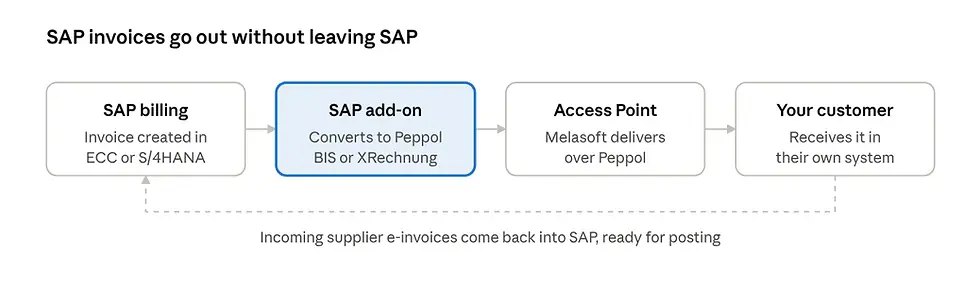
How Melasoft helps: Melasoft's SAP add-on connects SAP directly to the Peppol network. As a certified Peppol Access Point, we handle delivery ourselves, so there is no extra provider in between.
Scenario 2: E-invoicing integration for ERPs and marketplaces
Not every business runs SAP. Many mid-sized companies work with Microsoft Dynamics, Odoo or a local ERP. A growing number of others sell mainly through Amazon, Shopify or similar platforms.
For these businesses, building a custom connection from scratch is rarely worth it. A ready-made integration links your existing system to the e-invoicing network, so invoices go out automatically in a structured format such as UBL or CII as soon as they are created.

How Melasoft helps: Docnova connects to common ERPs and marketplaces, and sends and receives e-invoices through our own Peppol Access Point. Your team keeps working in the tools it knows.
Scenario 3: E-invoicing software for small businesses and freelancers
This is where most small businesses and freelancers are. Invoices are created in Word, Excel or a basic invoicing app, then emailed as PDFs. Under the new mandates, a PDF is no longer an e-invoice: buyers and tax authorities expect machine-readable invoice data.
The good news: you do not need an ERP project to become compliant. A SaaS e-invoicing portal lets you create, send and receive structured e-invoices from your browser.
But the real value goes beyond compliance. Once your invoices are digital, you can see your business finances more clearly:
which invoices are paid, open or overdue
what is coming in and going out this month
incoming supplier invoices in one place, instead of scattered across inboxes

How Docnova helps: The Docnova portal is built for SMEs and freelancers. You can issue compliant e-invoices in minutes, receive invoices from suppliers through Peppol, and keep track of your cash flow from one screen. It is not just an e-invoicing tool; it is a simple way to stay on top of your business finances.
Scenario 4: E-invoicing API for software providers
If you are an ERP vendor, an accounting platform or a niche software provider, the question is different. E-invoicing is not something you need for yourself; it is something your customers now expect from your product.
Building and maintaining connections to every country's network, format and tax authority platform is a heavy, never-ending job. An e-invoicing API lets you offer it as a native feature instead. Your customers send and receive e-invoices without leaving your software, while the provider takes care of formats, validation and delivery.

How Melasoft helps: The Docnova API gives software providers access to the Peppol network through a single connection. You focus on your product; we keep up with changing formats and country rules.
E-invoicing solutions compared side by side
Here is how the four options compare:
SAP add-on | ERP / marketplace integration | SaaS portal | API | |
Best for | SAP users, multi-entity groups | Mid-sized firms, online sellers | SMEs, freelancers | Software providers |
Invoices created in | SAP | Your ERP or shop | The portal | Your own product |
IT effort | Low to medium, inside SAP | Low, connector setup | None | Development work on your side |
Who uses it | Your finance team | Your finance or sales team | You and your accountant | Your customers |
Checklist: how to choose an e-invoicing provider
Before you talk to any provider, take ten minutes to answer these questions.
Source system: Where are invoices created today: SAP, another ERP, a marketplace or by hand?
Countries: Which countries do you invoice from and to, now and in the next two years?
Direction: Do you need to send e-invoices, receive them, or both? (Most mandates require both.)
Legal entities: How many companies or VAT numbers need to be connected?
Volume: Roughly how many invoices do you send and receive each month?
Internal capacity: Do you have IT resources for a project, or do you need something that works out of the box?
Growth: Could you outgrow your current setup, for example by moving from manual invoicing to an ERP?
One provider, four paths
Businesses change. A freelancer hires a team, a team adopts an ERP, a regional company expands into new markets. Switching e-invoicing providers every time that happens costs time and money.
That is why Melasoft offers all four paths on one platform. Whether you start with the Docnova portal, connect your ERP, run our SAP add-on or build on our API, your invoices travel through the same certified Peppol Access Point. When your needs grow, your setup can grow with them.
Not sure which path is yours?
Frequently asked questions
What is the difference between e-invoicing software and a Peppol Access Point?
E-invoicing software helps you create and manage invoices. A Peppol Access Point is the certified gateway that delivers them to your customer's provider. Some providers, like Melasoft, are both.
Is a PDF invoice an e-invoice?
No. Under the new EU mandates, an e-invoice is a structured file (such as Peppol BIS or XRechnung) that systems can read automatically. A PDF sent by email does not qualify.
What is EN 16931?
EN 16931 is the European standard for electronic invoices. It defines the core data every e-invoice must contain. Formats such as Peppol BIS Billing 3.0, XRechnung and Factur-X are built on it.
What is a Peppol API?
A Peppol API lets software send and receive e-invoices over the Peppol network through one technical connection, instead of building a separate link for every country.


Comments